Difference between revisions of "Timecard - Report"
Jump to navigation
Jump to search
Carsen der (talk | contribs) |
Carsen der (talk | contribs) |
||
| Line 4: | Line 4: | ||
[[File:Timecard - Report - Clicking timesheet tab gif.gif|center|thumb|1070x1070px]]The controls to the report are all in the top right. The estimator and the timeframe can be adjusted to filter the results. | [[File:Timecard - Report - Clicking timesheet tab gif.gif|center|thumb|1070x1070px]]The controls to the report are all in the top right. The estimator and the timeframe can be adjusted to filter the results. | ||
[[File:Timecard - Report - Report controls screenshot .png|center|thumb|338x338px|The filter controls]] | [[File:Timecard - Report - Report controls screenshot .png|center|thumb|338x338px|The filter controls]] | ||
| + | |||
| + | === Missing Timecard Report === | ||
| + | To view the Missing Timecard Report, press the "View Missed Timecards" button directly under the title. | ||
| + | [[File:Timecard - Report - View Missed Timecards Screenshot.png|center|thumb|978x978px]] | ||
| + | You can return to the main page by clicking the "Back" button. | ||
| + | [[File:Timecard - Report - Back button screenshot.png|center|thumb|967x967px]] | ||
[[Category:Timecard]] | [[Category:Timecard]] | ||
[[Category:Estimating]] | [[Category:Estimating]] | ||
Latest revision as of 19:30, 13 July 2023
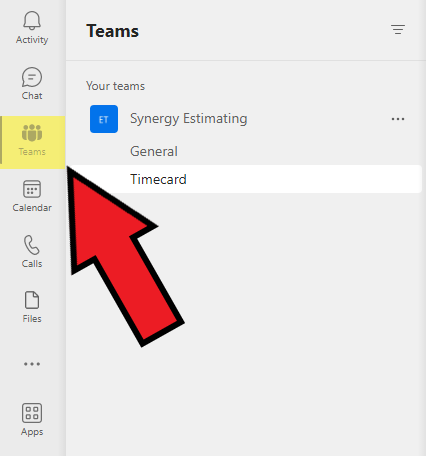
To view the timecard report page, click on the Teams tab on the left side of MS teams:

Next, click on "Your teams", click on the Synergy Estimating team and click on "Timecard"

Click the tab at the top of the page labeled "Timesheet" to display the Power BI report.

The controls to the report are all in the top right. The estimator and the timeframe can be adjusted to filter the results.

Missing Timecard Report
To view the Missing Timecard Report, press the "View Missed Timecards" button directly under the title.

You can return to the main page by clicking the "Back" button.
