Difference between revisions of "Breakdown"
Jump to navigation
Jump to search

| (11 intermediate revisions by the same user not shown) | |||
| Line 18: | Line 18: | ||
=== Title Rows === | === Title Rows === | ||
| − | + | First few rows to initialize the worksheet | |
| Line 24: | Line 24: | ||
=== Letter Totals === | === Letter Totals === | ||
| + | Below the Title Rows on the left exist the Alpha Labels | ||
| + | |||
| + | These are the Letters placed beside rows on Div's and are Totaled here | ||
| + | |||
| + | There are 3 Columns to this section | ||
| + | * Letter -> Shows the Letter for the Column (Non-editable) | ||
| + | * Description -> User can type a description to represent the letter (editable) | ||
| + | * Total -> Totals up all the rows marked with the letter (Non-editable) | ||
| + | |||
| + | If there isn't enough letters, you can press the [[Add User Item]] button and an additional 10 rows will be added | ||
| Line 30: | Line 40: | ||
=== Quantity and Unit === | === Quantity and Unit === | ||
| + | This Section is to the right of the Letter Totals section | ||
| + | It Displays the value of each letter total divided by the Unit total. | ||
| + | |||
| + | The Section is Composed of 3 sub-sections | ||
| + | * Row 3 -> The Value of each unit (editable) | ||
| + | * Row 4 -> The Name of each unit (up to 5 units) (editable) | ||
| + | * Letter Rows -> Displays the value of each letter total divided by the corresponding column unit total (Non-editable) | ||
[[File:Breakdown Quantity and Unit.png|center]] | [[File:Breakdown Quantity and Unit.png|center]] | ||
| − | |||
=== Full Page === | === Full Page === | ||
| − | + | With all the Sections combined together it creates the Breakdown page | |
[[File:Breakdown Full Page.png|center]] | [[File:Breakdown Full Page.png|center]] | ||
Latest revision as of 21:50, 16 July 2021
The Breakdown Page totals up letters placed in the SubForm Label Column on Div's
The Page is made up of 3 Sections of Information
| Section Name | Editable |
|---|---|
| Title Rows | No |
| Letter Totals | Partial |
| Quantity and Unit | Partial |
Title Rows
First few rows to initialize the worksheet

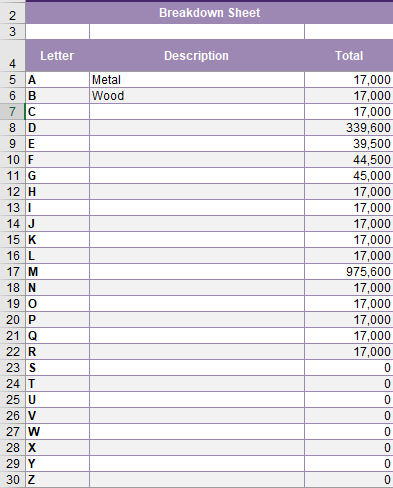
Letter Totals
Below the Title Rows on the left exist the Alpha Labels
These are the Letters placed beside rows on Div's and are Totaled here
There are 3 Columns to this section
- Letter -> Shows the Letter for the Column (Non-editable)
- Description -> User can type a description to represent the letter (editable)
- Total -> Totals up all the rows marked with the letter (Non-editable)
If there isn't enough letters, you can press the Add User Item button and an additional 10 rows will be added

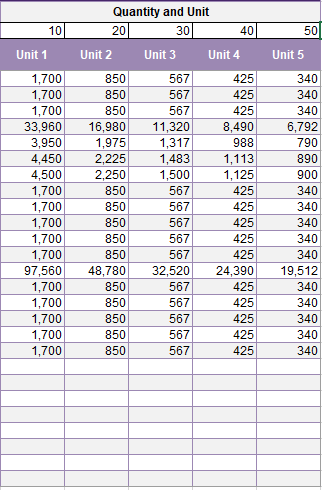
Quantity and Unit
This Section is to the right of the Letter Totals section
It Displays the value of each letter total divided by the Unit total.
The Section is Composed of 3 sub-sections
- Row 3 -> The Value of each unit (editable)
- Row 4 -> The Name of each unit (up to 5 units) (editable)
- Letter Rows -> Displays the value of each letter total divided by the corresponding column unit total (Non-editable)

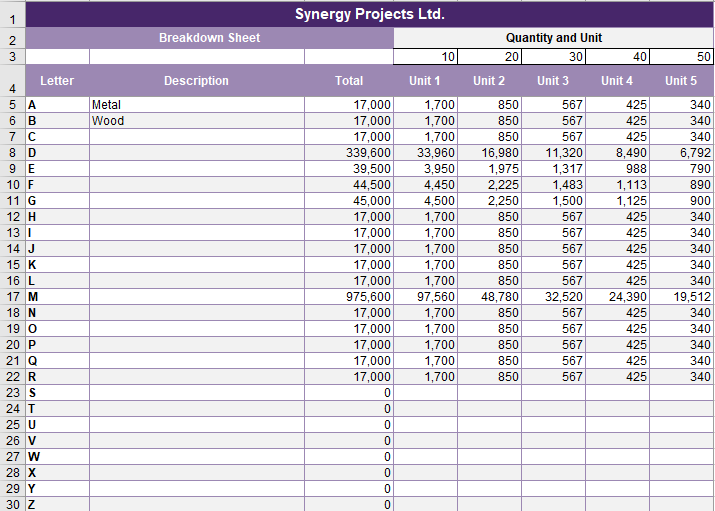
Full Page
With all the Sections combined together it creates the Breakdown page
