Difference between revisions of "Project Info"
Jump to navigation
Jump to search
| (4 intermediate revisions by the same user not shown) | |||
| Line 1: | Line 1: | ||
| − | + | # To Change the Project Info, the User must Press the Project info button and a Pop-Up should appear | |
| + | # You can edit the Rate, Amount and determine if we are calculating by a rate or an amount using the ByRate checkbox | ||
| + | # There is also a "Used in BD" checkbox that allows the user to enable or disable certain Info Items from being calculated in the Breakdown sheet | ||
| − | [[File: | + | [[File:ProjectInfoGIF.gif|center]] |
| − | |||
| − | + | [[Project Info Static]] | |
| − | [[ | ||
| − | |||
| − | |||
Latest revision as of 20:29, 1 February 2022
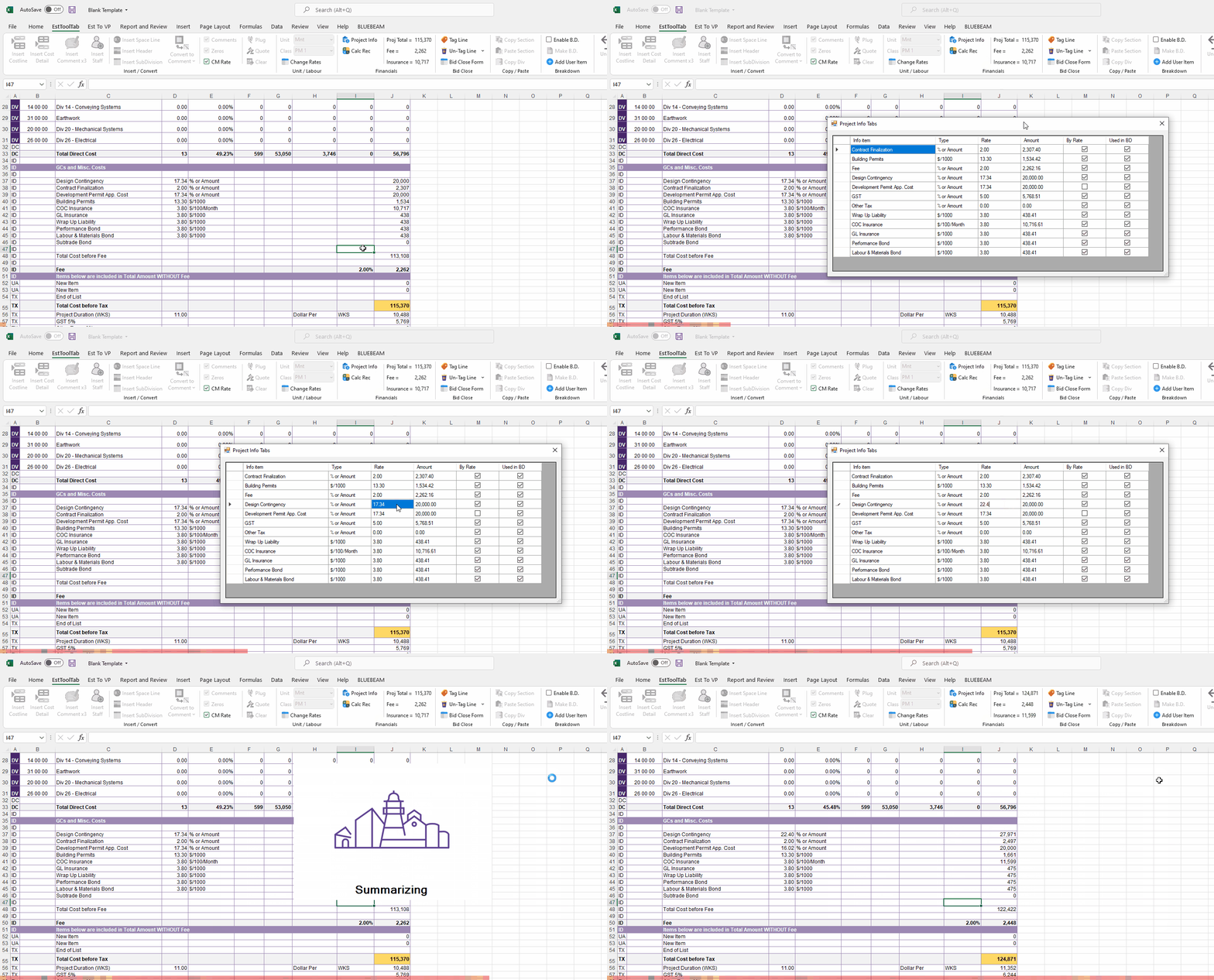
- To Change the Project Info, the User must Press the Project info button and a Pop-Up should appear
- You can edit the Rate, Amount and determine if we are calculating by a rate or an amount using the ByRate checkbox
- There is also a "Used in BD" checkbox that allows the user to enable or disable certain Info Items from being calculated in the Breakdown sheet
