Difference between revisions of "Consolidation"
Jump to navigation
Jump to search


| Line 1: | Line 1: | ||
| + | __TOC__ | ||
| + | |||
| + | |||
The Summary Page totals up and provides scope on the current project | The Summary Page totals up and provides scope on the current project | ||
Revision as of 22:11, 14 July 2021
The Summary Page totals up and provides scope on the current project
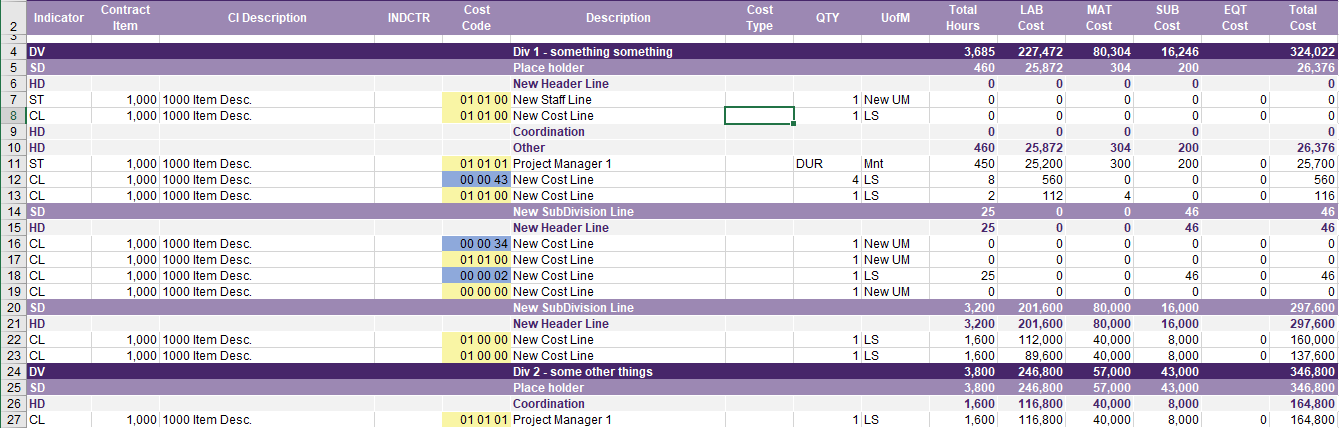
The Page is made up of 3 Sections of Information
Here is A Table Displaying which Section(s) are directly editable on the Consolidation Page
| Section Name | Directly Editable |
|---|---|
| Title Rows | No |
| Consolidated Div's | Partially |
| Summary Items | Partially |
Title Rows
The First few Rows are Used to establish a Title and title for each of the Columns

Consolidated Div's
After the title rows exists the Consolidated Data from the active Div's
This Data is mostly Non-editable however, Columns 2 - 5 (Contract Item - Cost Code) May be edited and each of these columns has its own unique properties
Column 2/B : Contract Item
- User can change the Contract Item number for the select row
Column 3/C : Contract Item Description
- User can change the Description of a row and all row's with the same Contact Item Number will also change to that new description
Column 4/D : INDCTR
- User can put a "p" on a row to set that row as the lead row for the Cost Code (Used in Export to CSV functionality)
Column 5/E : Cost Code
- User can change the Cost Code of a row and the Code will change.
Cost Code Colors

Summary Items (Optional)
